
Ultimate Guide to Order Status Monitoring for E-Commerce
Tracking orders is more than just a convenience - it's what customers expect. Here's the deal: 91% of shoppers track their packages, with 38% checking daily. If your e-commerce business doesn't provide clear, real-time updates, you're likely losing customer trust and facing unnecessary support tickets.
Why It Matters:
- Customer Trust: 85% of buyers won’t return after a poor delivery experience.
- Support Efficiency: 18% of all customer inquiries are "Where Is My Order" (WISMO) requests.
- Business Insights: Tracking helps optimize carrier performance and avoid delays.
Key Takeaways:
- Use multi-carrier shipping tools that integrate with carriers like FedEx, UPS, and DHL to provide updates.
- Automate notifications via email and SMS for better transparency.
- Host branded tracking pages on your domain to encourage repeat visits.
- Monitor key metrics like WISMO rates, on-time delivery, and order accuracy.
A solid order status monitoring system keeps customers informed, reduces support workload, and improves delivery reliability. Dive in to learn how to set one up and optimize it for your business.
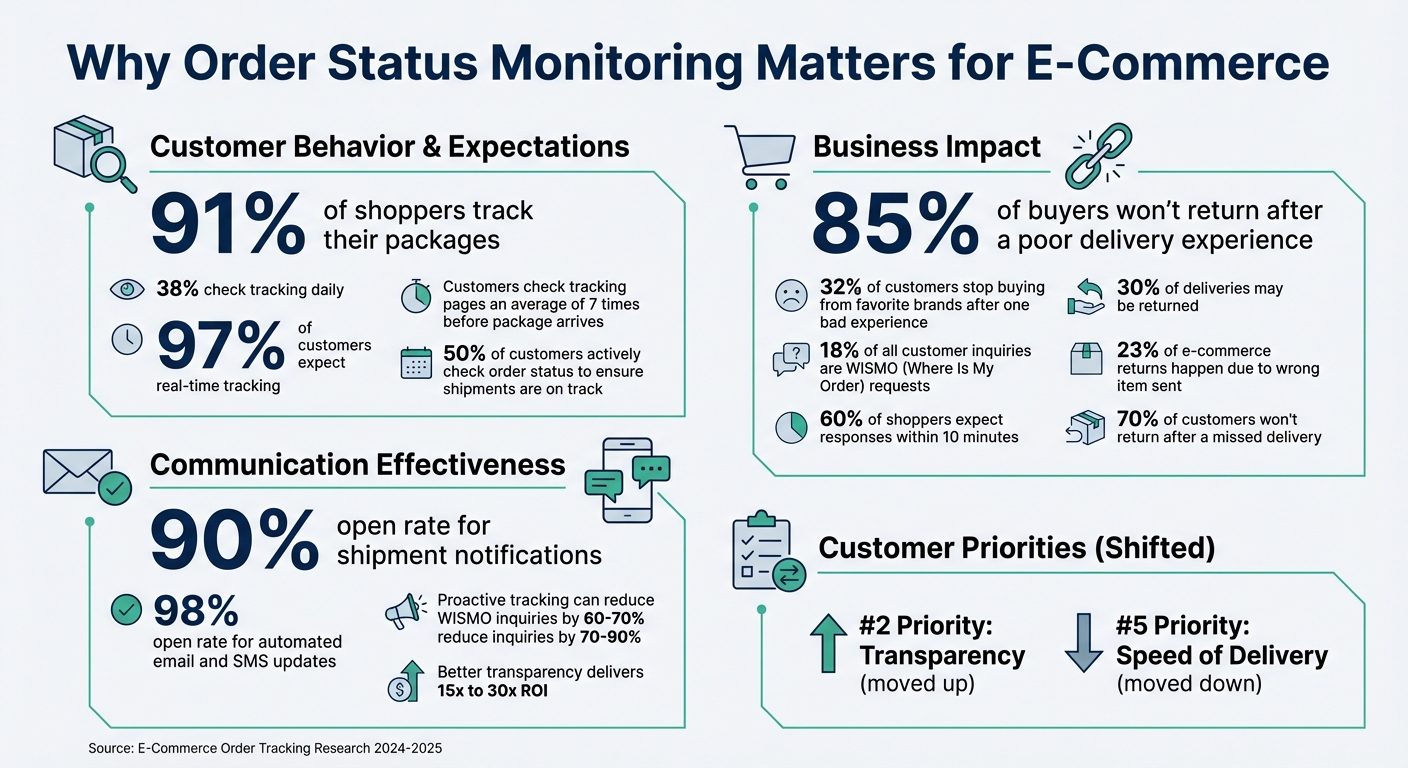
E-Commerce Order Tracking Statistics and Customer Expectations
Order Fulfillments Beta: Advanced Shipping Management & Tracking | WooCommerce 10.2
sbb-itb-ed0a9d1
How to Set Up an Order Status Monitoring System
Building an order status monitoring system that works well requires three key steps: defining your workflow, choosing the right tools, and integrating your systems.
Define Your Monitoring Workflow
Start by mapping out your entire fulfillment process - from verifying payments to final delivery. Break it down into detailed internal steps like "picked" and "packed", while simplifying the updates customers see, such as "processing" or "shipped". Be thorough - note how data flows between systems and estimate the time each step typically takes.
Set up exception rules to flag potential problems. For instance, mark packages as an issue if they stay "In Transit" for more than three days or if a shipping label is created but not scanned within 24 hours.
Interestingly, customer preferences have shifted. "Speed of Delivery" has dropped to the #5 priority, while "Transparency" has climbed to the #2 spot. This means your workflow should focus heavily on providing clear updates at every stage of the process.
Once you've outlined your workflow, it’s time to pick tools that align with your needs.
Choose the Right Tools and Platforms
A good monitoring system should support multi-carrier integration, connecting seamlessly with a wide range of carriers - ideally over 1,500. This minimizes errors like "tracking number not found".
Consider using branded tracking pages hosted on your domain (e.g., yourstore.com/tracking). These pages not only reinforce your brand but also encourage repeat visits. On average, customers check tracking pages seven times before their package arrives, creating multiple opportunities to encourage future purchases.
Automate notifications for key updates, using email and SMS. Reserve SMS for urgent alerts since it has a higher open rate.
A centralized monitoring dashboard is essential for businesses operating across platforms like Shopify, Amazon, and TikTok Shop. This dashboard should provide real-time analytics, helping you measure carrier performance, track delivery times, and reduce "Where Is My Order" (WISMO) inquiries. Platforms like Navexa (https://navexa.co) offer such tools, combining tracking with fulfillment management for complete operational visibility.
Once your system is up and running, the next step is to integrate it with your shipping carriers and fulfillment systems.
Integrate with Shipping Carriers and Fulfillment Systems
Integration typically happens through webhooks or APIs. Webhooks send "push" notifications in near real-time, automatically updating your system whenever a status changes. APIs, on the other hand, work as "pull" mechanisms, where your system requests updates at regular intervals, usually every 15–30 minutes.
To avoid duplicate notifications, register each webhook only once per tracking event. When using APIs, include parameters like HasTracking=true and IsTrackingUploaded=false to focus on orders that require updates. Also, ensure precise carrier name mapping between your e-commerce platform and tracking tool to avoid sync errors.
Automate address validation during checkout or fulfillment to cross-check against postal databases, reducing delivery issues.
Finally, integrate your tracking system with your helpdesk platform. This allows support agents to access tracking numbers and delivery updates without switching screens. This is especially important since WISMO inquiries make up 18% of all customer support tickets, and 60% of shoppers expect responses within 10 minutes.
A real-world example of this approach is SHEIN. In 2025, they implemented a comprehensive tracking system to handle their high volume of customer support inquiries. By offering proactive updates and a centralized tracking experience, they cut WISMO inquiries by 60% and improved support efficiency fivefold.
How to Improve Customer Experience with Order Status Monitoring
Once your system is in place, the next step is to focus on keeping your customers happy through clear communication and quick responses. Did you know that 97% of customers expect real-time tracking? This makes order status monitoring a key part of retaining your customers. A poor delivery experience can drive them away, so your tracking system isn’t just a tool - it’s a critical connection point.
Set Up Real-Time Notifications
Automated notifications are a game-changer. They ease customer concerns and cut down on support requests. With shipment notifications boasting a 90% open rate and 91% of consumers actively tracking their packages, keeping your customers updated in real time is a must.
Use multiple channels to send updates - email, SMS, and push notifications. Emails work well for standard updates like "Order Confirmed" or "Shipped." For urgent alerts like "Out for Delivery" or "Delivery Exception", SMS is more effective. This multi-channel strategy ensures that customers get updates in the way they prefer.
Make it easy for customers to track their orders by including "Track My Order" links everywhere - confirmation emails, SMS messages, AI chat tools, self-service portals, FAQ pages, and account dashboards. Personalizing the order status page can significantly reduce customer inquiries, sometimes by as much as 25%. Hosting the tracking page on your own domain (e.g., yourstore.com/tracking) not only reinforces your brand but also creates opportunities for further engagement. After all, half of all customers actively check order status to ensure their shipments are on track.
But what happens when things don’t go as planned? That’s where managing exceptions comes in.
Manage Exceptions and Delays
How you handle delays can set your brand apart. A single bad experience can cause 32% of customers to stop buying from even their favorite brands. That’s why being proactive and transparent is so important.
"Honesty is the best policy. By keeping customers informed in real time, customers will be given realistic expectations and will be more satisfied throughout the post-purchase experience." – ShipBob
When delivery issues arise, notify customers immediately. Avoid vague updates like "Shipment Delayed." Instead, be specific: "Your package is currently awaiting customs clearance. Expected delivery in 2-3 days". Set up custom exception rules for different types of delays - whether it’s a customs hold, weather issue, or a package stuck "In Transit" - so you can send tailored messages and alert your team to step in before things escalate. Offer solutions like reshipping, refunds, or store credits to show customers you care.
To make this process seamless, integrate your tracking data with your helpdesk platform. This allows support agents to access tracking numbers, carrier details, and delivery addresses without juggling multiple tabs. This is crucial, especially since "Where Is My Order" (WISMO) inquiries make up 18% of all customer support tickets.
Once you’ve tackled exceptions, the next step is to learn from your customers.
Use Customer Feedback to Improve Your System
Add a feedback widget to your branded tracking page to gather insights about the delivery experience right after the package arrives. This is the perfect time to ask, as the experience is still fresh in your customers' minds. Use this feedback to identify recurring issues, such as carriers with frequent delays or notifications that don’t hit the mark.
Keep an eye on Customer Satisfaction (CSAT) scores for the post-purchase journey. If scores dip, dig into the details - are you sending too many minor updates (like every movement within a sorting facility) or missing critical alerts? Striking the right balance is essential, as too many notifications can overwhelm customers, while too few can leave them in the dark.
Also, track which carriers are responsible for the most complaints about damaged goods or failed deliveries. Use this data to adjust your shipping strategy. Tools like Navexa (https://navexa.co) provide real-time analytics that link tracking data with carrier performance, giving you actionable insights. Finally, consider tailoring update frequency to the product type. For example, buyers of luxury goods might want updates at every step, while apparel shoppers might only care about major milestones.
How to Measure and Analyze Performance
Tracking performance is essential for identifying issues and improving operations. By focusing on key metrics, you can ensure your order monitoring system continues to enhance customer satisfaction.
Key Metrics to Track
Start with the WISMO Rate - the percentage of orders that prompt customers to ask, "Where Is My Order?" You can calculate it using this formula: (WISMO Inquiries / Total Orders) x 100. A high WISMO rate suggests your tracking system lacks clarity. Implementing a post-purchase orchestration platform can reduce these inquiries by 70% to 90%.
Next, consider your Perfect Order Rate, which measures the percentage of orders delivered on time, complete, damage-free, and with accurate documentation. The median benchmark for this metric is around 90%. Why does it matter? About 70% of customers won’t return after a missed delivery, and 23% of e-commerce returns happen because the wrong item was sent.
You should also keep an eye on On-Time Shipping and On-Time Delivery. These metrics serve different purposes: on-time shipping reflects your warehouse performance, while on-time delivery measures your carrier's efficiency. If your on-time shipping rate drops below 93.4%, it’s a sign that immediate action is needed.
Finally, track Order Picking Accuracy. Top-performing companies achieve accuracy rates as high as 99.8%. Matt Crane, Co-Founder and Chief Science Officer at Semaine Health, shared his experience:
"I'm just stunned by how accurate our orders are, and our error rate is just vanishingly small now. Honestly, it's been a game-changer for us, because we're experiencing way fewer customer service issues than before, while growing 4x".
Here’s a quick summary of these metrics:
| Metric | Formula | What It Measures |
|---|---|---|
| WISMO Rate | (WISMO Inquiries / Total Orders) x 100 | Transparency of tracking system |
| Perfect Order Rate | % On-time x % Complete x % Damage-free x % Accurate Docs | Overall fulfillment quality |
| On-Time Shipping | (Orders Shipped On Time / Total Orders) x 100 | Warehouse efficiency; red flag below 93.4% |
| Order Picking Accuracy | (Correct Items Picked / Total Items) x 100 | Warehouse accuracy and return risk |
Use Analytics to Improve Operations
Real-time analytics are invaluable for spotting bottlenecks and improving efficiency. Dashboards can provide insights into pick rates, packing times, and shipping deadlines, helping you act quickly when performance dips. Ryan Steffenson, Senior Manager of Channel Operations at Tonies, highlights the importance of real-time data:
"Having this real-time data is crucial for my team, so the fact that there's not hours of lag time waiting for data to update is huge".
Drill-down reporting can help you uncover the root causes of errors or delays. For instance, if your on-time delivery rate drops, you can analyze whether specific carriers, warehouse zones, or regions are contributing to the issue. Automated alerts can also notify you when Service Level Agreements (SLAs) are at risk.
Navexa’s analytics go a step further by connecting tracking data with carrier performance, giving you actionable insights. Use this data to set accurate reorder points, reduce overstock, and avoid stockouts. Geographic distribution reports can pinpoint areas with high order volumes, allowing you to position inventory closer to customers and cut down on transit times.
Reduce Support Tickets with Better Transparency
Improved tracking transparency doesn’t just keep customers informed - it also reduces the number of support tickets. Since WISMO inquiries make up about 18% of all customer support tickets, a well-designed tracking system can significantly lighten your support team’s workload.
Kely Keehan, Senior Digital Marketing Strategist, shared her experience:
"We would get 20 to 25 calls each day from frustrated customers asking us 'where is my order?' Now that we're using the WISMOlabs system, we're getting 0 to 2 calls each day".
To identify weak spots in your tracking process, tag support inquiries by their root cause - such as delayed tracking updates, missed deliveries, or unclear status messages. Integrating tracking data with your helpdesk platform can also streamline support by giving agents easy access to tracking numbers, carrier details, and delivery addresses - all in one place.
As Kris Gösser, CMO of Shipium, explains:
"A consistently high number of WISMO requests points to gaps in your post-purchase experience, which increases operational costs".
Better transparency doesn’t just reduce complaints - it can also boost sales. Shorter delivery windows build customer confidence, encouraging them to explore your branded tracking page and potentially make additional purchases, delivering a 15x to 30x return on investment.
Conclusion
Key Takeaways
Keeping tabs on order status does more than just inform customers - it helps streamline operations and manage expectations. The numbers speak volumes: 97% of customers want to track their orders at every stage, and 85% will avoid a retailer after a poor delivery experience. A strong system brings everything together: it consolidates data from multiple carriers into one dashboard, automates notifications for key updates, and uses a branded tracking page instead of sending customers to carrier websites. This not only reduces the dreaded "Where Is My Order" inquiries but also paves the way for repeat purchases by creating a seamless post-purchase experience.
Customer priorities have evolved. Transparency now ranks as the second-highest priority, while delivery speed has dropped to fifth place. Customers don’t need to know every detail, like when their package left the depot at 3 AM. What they value are timely updates - when the order ships, when it’s out for delivery, and especially when delays occur. Automated email and SMS updates, which boast an impressive 98% open rate, help build trust and reduce the anxiety that often leads to support inquiries.
Platforms like Navexa exemplify this approach by centralizing data, automating notifications, and offering real-time analytics. With integrations across 50+ platforms, these tools connect tracking data with carrier performance, automate workflows to minimize errors, and deliver a scalable solution. The result? High operational efficiency, including 95–99% inventory accuracy and strong order fulfillment metrics.
These strategies can immediately elevate your fulfillment process and customer experience.
Next Steps for Your Business
To optimize your order status monitoring, start by reviewing your current setup. Is your tracking page hosted on your domain? Are customers receiving automated updates at critical milestones? Can you view all orders across multiple sales channels in one dashboard? If the answer to any of these is no, addressing these gaps can significantly improve both efficiency and customer satisfaction.
For businesses handling lower order volumes, carrier-provided tracking might suffice - for now. But as your operations grow, a centralized solution becomes essential. A robust system unifies data from multiple carriers, standardizes status updates, and flags issues like unscanned shipments within 24 hours. Adding features like address validation can help prevent delivery errors, while integrating tracking with your helpdesk ensures support agents have all the information they need without switching between platforms. Don’t overlook returns either - 30% of deliveries may be returned, making effective return tracking critical for maintaining customer loyalty.
Use the metrics you already collect to pinpoint weaknesses, refine your workflows, and consistently improve the post-purchase experience. These steps not only enhance your operations but also build the trust and satisfaction that keep customers coming back.
FAQs
How does order status monitoring build customer trust and reduce support requests?
Keeping customers in the loop with order status monitoring is a game-changer for building trust. By providing real-time updates and clear visibility into their purchases, you eliminate the guesswork and give customers peace of mind knowing their items are on track.
This approach doesn’t just enhance the shopping experience - it also reduces the flood of support tickets about delivery questions. That means less stress for your team and more satisfied customers. When communication is clear and consistent, it builds confidence, encouraging loyalty and repeat business.
What tools are essential for setting up an effective order status monitoring system?
To build a reliable order status monitoring system, you'll need the right tools to handle real-time tracking, automate processes, and simplify management. Start with a solid order management system (OMS). This tool brings all your order data into one place, automates workflows, and provides a clear view of every stage in the order process - from the moment a customer places an order to its delivery. By minimizing manual errors and syncing with sales channels and fulfillment partners, an OMS becomes the backbone of your operation.
Next, incorporate carrier tracking solutions that integrate with major shipping providers like FedEx, UPS, DHL, and USPS. These tools ensure you and your customers receive real-time shipment updates, delivery timelines, and notifications about any delays. To take it a step further, set up automated alerts via email or SMS, keeping your customers informed and boosting their confidence in your service.
Lastly, use analytics and performance dashboards to track how efficiently your orders are being fulfilled and pinpoint areas for improvement. Tools like Navexa provide real-time analytics, seamless integrations, and automated workflows, making it easier to refine your processes. When combined, these tools create a system that not only enhances customer satisfaction but also keeps your operations running smoothly.
How can e-commerce businesses handle delivery exceptions and keep customers happy?
E-commerce businesses can tackle delivery exceptions and keep customers happy by setting up clear workflows to quickly spot and fix problems like damaged shipping labels, incorrect addresses, or carrier delays. While these hiccups might throw off delivery schedules, they don’t always mean the package is lost or the order is canceled. Having well-organized processes and open communication ensures these issues are resolved quickly, keeping customers in the loop and preserving their trust.
To take customer satisfaction up a notch, businesses should offer real-time tracking updates and send proactive notifications about shipment progress, including any delays or exceptions. Being transparent helps manage expectations and prevents unnecessary frustration. Using advanced fulfillment platforms that automate exception handling and simplify operations can further reduce disruptions, creating a smoother delivery experience for everyone involved.
Ship your next order through Navexa.
Connect a store, buy a label, and see the numbers yourself.